1. What is Windows Protection Suite?
It is bogus computer security related program very similar to earlier arisen Windows Security Suite. Both programs are intended to display untrue virus and spyware alerts, thus scaring user and making him believe that he needs to solve seemingly emerged problems with a help of Windows Protection Suite. Far from it... Windows Protection Suite not only is unable to solve any computer problems, but also will be configured to run on Windows system startup, each time performing a computer scan with uncertain report generated in the end.
Windows Security Suite is a hundred percent scam and should be removed as soon as any related symptoms have been noticed. It is recommended that Windows Protection Suite removal process is performed using Spyware Doctor anti-spyware, due to the fact that it is automatic removal procedure with no need to manage infected files manually. One must admit that Add/Remove Programs is incapable to remove Windows Protection Suite properly, as the infection may be regenerated.
System Alert: Potentially harmful programs have been detected on your system and need to be dealt with immediately. Click here to remove them with Windows Protection Suite.
Affected OS: Windows 98, Windows NT, Windows XP, Windows Vista.
To start Windows Protection Suite removal operation, main virus process has to be terminated. Due to the fact that process name is random, first you have assure you kill the right process. To do that, download HijackThis. Run executable file, agree to the terms, click Do a system scan only and wait till the scan is over. Now find an entry O4 - HKCU\..\Run: [Windows Protection Suite] "C:\Documents and Settings\All Users\Application Data\9b8ecb6\WI9b8e.exe" /s /d. Directory 9b8ecb6 and main virus file WI9b8e.exe names are random, so there might be a mismatch in entry. Memorize the name of .exe file (in this case WI9b8e.exe) and end the process (see step 1 how to end processes.)
Windows Security Suite is a hundred percent scam and should be removed as soon as any related symptoms have been noticed. It is recommended that Windows Protection Suite removal process is performed using Spyware Doctor anti-spyware, due to the fact that it is automatic removal procedure with no need to manage infected files manually. One must admit that Add/Remove Programs is incapable to remove Windows Protection Suite properly, as the infection may be regenerated.
System Alert: Potentially harmful programs have been detected on your system and need to be dealt with immediately. Click here to remove them with Windows Protection Suite.
Affected OS: Windows 98, Windows NT, Windows XP, Windows Vista.
To start Windows Protection Suite removal operation, main virus process has to be terminated. Due to the fact that process name is random, first you have assure you kill the right process. To do that, download HijackThis. Run executable file, agree to the terms, click Do a system scan only and wait till the scan is over. Now find an entry O4 - HKCU\..\Run: [Windows Protection Suite] "C:\Documents and Settings\All Users\Application Data\9b8ecb6\WI9b8e.exe" /s /d. Directory 9b8ecb6 and main virus file WI9b8e.exe names are random, so there might be a mismatch in entry. Memorize the name of .exe file (in this case WI9b8e.exe) and end the process (see step 1 how to end processes.)
2. Windows Protection Suite screen shot:

3. How to remove Windows Protection Suite:
- Internet connection might be disabled or Internet browser might be blocked by Windows Protection Suite, so it won't be possible to download any files to infected computer. In this case please download all files required for Windows Protection Suite removal to another computer and then transfer them on the infected one using CD/DVD or USB flash drive.
- To remove Windows Protection Suite download Spyware Doctor and install the program (for the installation guide click here). Before installation, make sure all other programs and windows are closed.
-
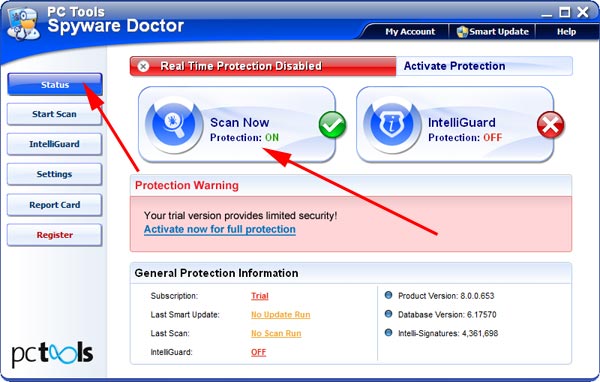
After the installation, computer scan should be started automatically. If so, please move to the next step. If not, click "Status" on the left side menu and press "Scan Now" button to run computer scanner as shown in the picture below:
-
After the scan has been completed and scan results have been generated, press "Fix Checked" button to remove Windows Protection Suite.

- Restart the computer to complete Windows Protection Suite removal procedure.
Due to the fact that access to some .exe files is blocked, Windows Task Manager (taskmgr.exe) as well as anti-spyware programs cannot be started. To start anti-spyware program you've just downloaded, some changes have to be made: go to program directory (C:\Program Files\Spyware Doctor\) and rename pctsGui.exe to pctsGui.com. Then double click renamed file and begin computer scan. After Windows Protection Suite has been removed, restart computer and change earlier modified file name back to pctsGui.exe.
4. Windows Protection Suite files:
WI8fec.exe (file name can be random)5. Hijackthis entries:
O4 - HKCU\..\Run: [Windows Protection Suite] "C:\Documents and Settings\All Users\Application Data\8fec08c\WI8fec.exe" /s /d |