1. What is Windows Police Pro?
It is a deceptive computer security application that is classified as a rogue program. Windows Police Pro belongs to the same family as Windows Antivirus Pro and Your PC Protector, also is related to Google redirect virus. These types of programs are created to mislead user by providing him false information about computer insecurity, although the system was clean and secure before Windows Police Pro has been installed. In fact, Windows Police Pro acts as an ordinary antivirus program: it scans your computer for viruses and other threats, as well as giving report in the end, except that the report content is fake and incorrect. Finally, the program offers to remove found threats, only if licensed version is bought. Do not make any payments related to this rogue program, because even after the purchase it will not remove any of real viruses, and furthermore, will not protect PC from future infections.
Windows Police Pro will corrupt Windows Security Center by displaying promotional note in Virus Protection area. It will also display balloon shaped warnings in the taskbar area about computer insecurity, persuading user to enable protection by purchasing the program.
Windows Police Pro will forbid to run other security programs including Hijackthis tool, stating that those are insecure applications. Even access to Windows Registry Editor (regedit.exe), System Restore, Task Manager and Internet Explorer is blocked.
2. Windows Police Pro.exe
Windows Police Pro will corrupt Windows Security Center by displaying promotional note in Virus Protection area. It will also display balloon shaped warnings in the taskbar area about computer insecurity, persuading user to enable protection by purchasing the program.
Windows Police Pro will forbid to run other security programs including Hijackthis tool, stating that those are insecure applications. Even access to Windows Registry Editor (regedit.exe), System Restore, Task Manager and Internet Explorer is blocked.
To start Windows Police Pro removal process:
end the following processes with Task Manager in the sequence displayed (What to do if Task Manager has been blocked?):
1. svchasts.exe2. Windows Police Pro.exe
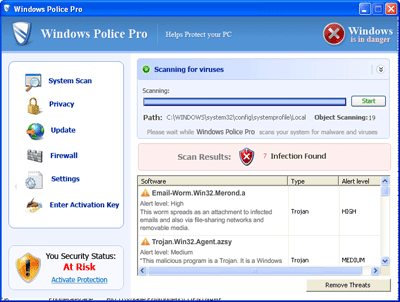
2. Windows Police Pro screen shot:
3. How to remove Windows Police Pro:
- Internet connection might be disabled or Internet browser might be blocked by Windows Police Pro, so it won't be possible to download any files to infected computer. In this case please download all files required for Windows Police Pro removal to another computer and then transfer them on the infected one using CD/DVD or USB flash drive.
- To remove Windows Police Pro download Spyware Doctor and install the program (for the installation guide click here). Before installation, make sure all other programs and windows are closed.
-
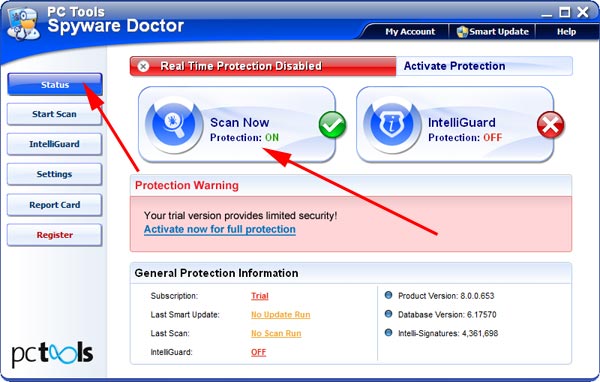
After the installation, computer scan should be started automatically. If so, please move to the next step. If not, click "Status" on the left side menu and press "Scan Now" button to run computer scanner as shown in the picture below:
-
After the scan has been completed and scan results have been generated, press "Fix Checked" button to remove Windows Police Pro.

- Restart the computer to complete Windows Police Pro removal procedure.
How to run .exe files, that has been disabled by virus? First what you have to do is make a copy of regedit.exe:
1. Go to Start, Run and type in
command.com
2. In opened Dos window type (press Enter before typing new line):
cd\
cd windows
copy regedit.exe regedit.com
start regedit.com
3. In the left side of opened Registry Editor window, navigate to
HKEY_CLASSES_ROOT\exefile\shell\open\command
and double click Default value in the right side of Registry Editor window. Under Value data, delete existing value and type "%1" %* (quotes included!) and press OK.
EXE files should be running now.
To remove "Danger! Your computer is infected" desktop background, go to Control Panel, Display, choose Desktop tab, click Customize Desktop and choose Web tab. Under Web pages an entry with ticked box should be present. Click on that entry and press Delete.
1. Go to Start, Run and type in
command.com
2. In opened Dos window type (press Enter before typing new line):
cd\
cd windows
copy regedit.exe regedit.com
start regedit.com
3. In the left side of opened Registry Editor window, navigate to
HKEY_CLASSES_ROOT\exefile\shell\open\command
and double click Default value in the right side of Registry Editor window. Under Value data, delete existing value and type "%1" %* (quotes included!) and press OK.
EXE files should be running now.
To remove "Danger! Your computer is infected" desktop background, go to Control Panel, Display, choose Desktop tab, click Customize Desktop and choose Web tab. Under Web pages an entry with ticked box should be present. Click on that entry and press Delete.
4. Windows Police Pro files:
svchasts.exe, desote.exe, windows police pro.exe5. Hijackthis entries:
C:\WINDOWS\system32\desote.exe |
O23 - Service: AntipyProex (AntipPro2009_100) - Unknown owner - C:\WINDOWS\svchasts.exe. |