1. What is General Antivirus?
General Antivirus is a corrupt anti-virus program, because of its inability to deal with computer viruses and malicious objects that may be posing serious risks. General Antivirus is also known as a scareware, because of its deceitful computer scanner, which results in false virus detections, thus making user believe that the computer system is infected. General Antivirus is very similar to rogue programs Internet Antivirus Pro and Live Enterprise Suite.
General Antivirus is configured so that the scanner starts each time computer is started and Windows OS is booted. During the scan process a number of virus-like titles will appear in the report, thus warning user that threats have been found on the computer. This is an effective way to persuade user that the machine is at risk, at the same time suggesting General Antivirus as anti-virus tool to solve computer security problems, which were allegedly found by the program itself. But the program will not do anything until user purchased licensed version of General Antivirus.
User should not trust General Antivirus as anti-virus software, because the program is unable to clean computer from viruses and other threats, even if the license has been purchased. Do not make any payments, as to do so will cause personal data disclosure to third parties.
General Antivirus can be identified by System alerts displayed in the taskbar area next to program icon stating that:
General Antivirus is configured so that the scanner starts each time computer is started and Windows OS is booted. During the scan process a number of virus-like titles will appear in the report, thus warning user that threats have been found on the computer. This is an effective way to persuade user that the machine is at risk, at the same time suggesting General Antivirus as anti-virus tool to solve computer security problems, which were allegedly found by the program itself. But the program will not do anything until user purchased licensed version of General Antivirus.
User should not trust General Antivirus as anti-virus software, because the program is unable to clean computer from viruses and other threats, even if the license has been purchased. Do not make any payments, as to do so will cause personal data disclosure to third parties.
General Antivirus can be identified by System alerts displayed in the taskbar area next to program icon stating that:
- Your PC is still infected with dangerous viruses. It is strongly recommended to activate antivirus protection to prevent data loss and to avoid the theft of your credit card details. Click here to activate protection.
- General Antivirus Tray Agent. General Antivirus has detected harmful software in your system. We strongly recommended you to register General Antivirus to remove these threats immediately.
- While running Windows in normal mode, malicious processes won't let to download any files. Safe Mode is required to download removal tool:
- Restart the computer;
- As soon as white letters on a black background appear, start tapping F8 key on your keyboard;
- After Windows Advanced Options Menu appeared, select an option "Safe Mode with Networking";
- Log in as a user;
- Act Yes on Desktop warning;
- Download General Antivirus removal tool to Desktop, but do not install yet;
- Restart and boot the computer as usual;
- Follow these installation instructions.
2. General Antivirus screen shot:

3. How to remove General Antivirus:
- Internet connection might be disabled or Internet browser might be blocked by General Antivirus, so it won't be possible to download any files to infected computer. In this case please download all files required for General Antivirus removal to another computer and then transfer them on the infected one using CD/DVD or USB flash drive.
- To remove General Antivirus download Spyware Doctor and install the program (for the installation guide click here). Before installation, make sure all other programs and windows are closed.
-
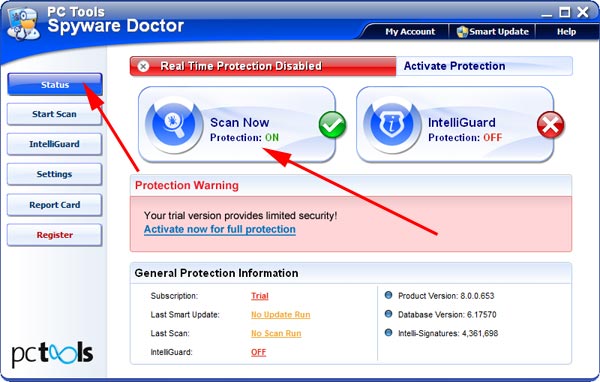
After the installation, computer scan should be started automatically. If so, please move to the next step. If not, click "Status" on the left side menu and press "Scan Now" button to run computer scanner as shown in the picture below:
-
After the scan has been completed and scan results have been generated, press "Fix Checked" button to remove General Antivirus.

- Restart the computer to complete General Antivirus removal procedure.
4. General Antivirus files:
C:\program files\General Antivirus\GenAvir.exec:\program files\General Antivirus\uninstall.exe
5. Hijackthis entries:
O4 - HKCU\..\Run: [Microsoft Windows logon process] C:\Documents and Settings\user\Application Data\Microsoft\Windows\winlogon.exe |
O4 - HKCU\..\Policies\Explorer\Run: [General Antivirus] "c:\program files\General Antivirus\GenAvir.exe" /s |
O4 - HKCU\..\Policies\Explorer\Run: [inor] "C:\WINDOWS\system32\mui\041D\inor.exe" |
O23 - Service: Guard Service (HTGrdEngine) - Unknown owner - C:\Documents and Settings\user\Local Settings\Application Data\Microsoft\Windows\services.exe |