1. What is Internet Antivirus Pro?
Internet Antivirus Pro is a rogue computer security program, which imitates antivirus software. Infection is initiated by opening a webpage, which simulates My Computer window, displaying hard disks and folders with trojans and viruses in them. Imitated scan process is displayed below. Closing or clicking the window will result in Internet Antivirus Pro download and installation. It is not recommended to use the "X" or Alt+F4 to close the window; end iexlorer.exe process with task manager instead.
Although the program is unable to remove viruses and other malware, it's acting like an ordinary antivirus software:
Internet Antivirus Pro will display fake Windows Security Center very similar to original one, so it very tricky not to walk into a trap:
Although the program is unable to remove viruses and other malware, it's acting like an ordinary antivirus software:
- scans computer system for any threats;
- generates report with a list of various virus names;
- pops warning windows, that alert user about threats detected.
Internet Antivirus Pro will display fake Windows Security Center very similar to original one, so it very tricky not to walk into a trap:
- in all sections (Firewall, Automatic Updates and Virus protection) there's a link (How does antivirus software help protect my computer?) to payment page, where victim will be asked to buy rogue program;
- clicking on Recommendations button, registration form will open, asking to enter the key for the program.
- balloon type "Privacy Violation alert!" will pop up time to time on the fake Windows Security Center icon in taskbar area: Internet Antivirus Pro detected a Privacy Violation. A program is secretly sending your private data to an untrusted internet host. Click here to block this activity by removing the threat (Recommended).
2. Internet Antivirus Pro screen shot:

3. How to remove Internet Antivirus Pro:
- Internet connection might be disabled or Internet browser might be blocked by Internet Antivirus Pro, so it won't be possible to download any files to infected computer. In this case please download all files required for Internet Antivirus Pro removal to another computer and then transfer them on the infected one using CD/DVD or USB flash drive.
- To remove Internet Antivirus Pro download Spyware Doctor and install the program (for the installation guide click here). Before installation, make sure all other programs and windows are closed.
-
After the installation, computer scan should be started automatically. If so, please move to the next step. If not, click "Status" on the left side menu and press "Scan Now" button to run computer scanner as shown in the picture below:
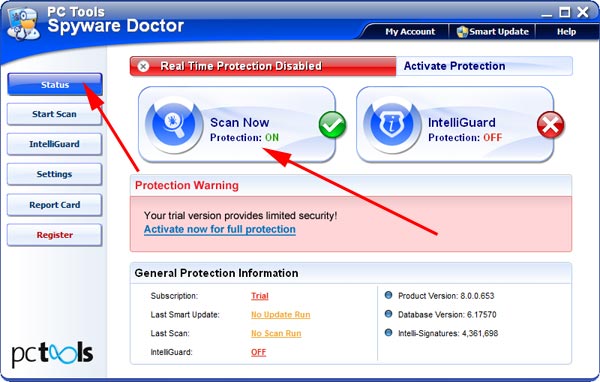
-
After the scan has been completed and scan results have been generated, press "Fix Checked" button to remove Internet Antivirus Pro.

- Restart the computer to complete Internet Antivirus Pro removal procedure.
4. Internet Antivirus Pro files:
IAPro.exe, services.exe, winlogon.exe5. Hijackthis entries:
O4 - HKCU\..\Run: [Microsoft Windows logon process] C:\Documents and Settings\000\Application Data\Microsoft\Windows\winlogon.exe |
O4 - HKCU\..\Run: [Internet Antivirus Pro] "c:\program files\Internet Antivirus Pro\IAPro.exe" /s |
O23 - Service: Guard Service (ITGrdEngine) - Unknown owner - C:\Documents and Settings\000\Local Settings\Application Data\Microsoft\Windows\services.exe |