1. What is WinPCDoctor?
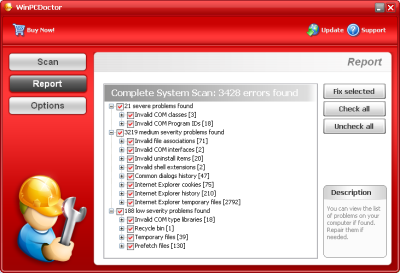
This program is known as rogue computer security software. The first discernible feature is a popup in the taskbar area saying that "your computer is infected", which after clicking on it is directing user to WinPCDoctor webpage and asking him to download application so that computer scan could be performed. After malware search, the report is given which contains simulated PC infections in order to scare user and make him to transfer money for commercial program version, which (as WinPCDoctor claims) will remove found malware. But in fact program will not act as promised because it is not able to clean computer system properly.
2. WinPCDoctor screen shot:
3. How to remove WinPCDoctor:
- Internet connection might be disabled or Internet browser might be blocked by WinPCDoctor, so it won't be possible to download any files to infected computer. In this case please download all files required for WinPCDoctor removal to another computer and then transfer them on the infected one using CD/DVD or USB flash drive.
- To remove WinPCDoctor download Spyware Doctor and install the program (for the installation guide click here). Before installation, make sure all other programs and windows are closed.
-
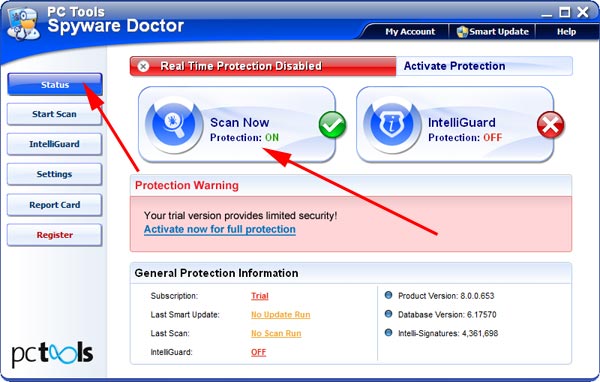
After the installation, computer scan should be started automatically. If so, please move to the next step. If not, click "Status" on the left side menu and press "Scan Now" button to run computer scanner as shown in the picture below:
-
After the scan has been completed and scan results have been generated, press "Fix Checked" button to remove WinPCDoctor.

- Restart the computer to complete WinPCDoctor removal procedure.
4. WinPCDoctor files:
setup_en.exe (setup file), strpmon.exe, SysRep.exe, ucookw.exe5. Hijackthis entries:
O4 Entries: |
O4 - HKLM\..\Run: [WinPCDoctor] C:\Program Files\WinPCDoctor\SysRep.exe |
O4 - HKLM\..\Run: [ucookw] "C:\PROGRA~1\WINPCD~1\ucookw.exe" -start |
O4 - HKLM\..\Run: [Salestart(1)] "C:\Program Files\Common Files\WinPCDoctor\strpmon.exe" dm=http://winpcdoctor.com ad=http://winpcdoctor.com sd=http://inspaid.winpcdoctor.com |