1. What is Vista Antispyware 2010, Vista Guardian and Vista Internet Security?
Vista Antispyware 2010, Vista Guardian and Vista Internet Security due to unauthorized and illegal behavior are classified as rogue programs, which have been created to mislead computer user in order to receive cash transfers giving nothing valuable in return. Other possible titles:
Rogue software is the way creators make profit and steal confidential information. To achieve user confusion, Vista Antispyware 2010, Vista Guardian and Vista Internet Security uses several aggressive techniques listed below.
First, internet browser (Internet Explorer, Mozilla Firefox) will be hijacked and for this reason user attempt to open any Web page will fail resulting in a message stating that the page is not safe to display.
Other programs, which may interfere or otherwise impede Vista Antispyware 2010, Vista Guardian or Vista Internet Security activity will be blocked, as precaution against the possible elimination of the program.
To scare user Vista Antispyware 2010, Vista Guardian and Vista Internet Security will display false messages stating that computer system has been infected and often user, first time confronted with this kind of fraud, will believe in a lie.
The user is also being tricked by integrated computer scanner, which will show computer scan progress simultaneously detecting non-existent viruses, trojans and other threats. After the scan has been completed a report will be generated containing found infections, which do not even exist. Threat names displayed in report are only used to bluff the user thus trying to convince him to buy fake rogue program license, which promises to clean the computer by removing allegedly found viruses. Do not make any payments related to Vista Antispyware 2010, Vista Guardian and Vista Internet Security, because it is an internet fraud and will not remove computer threats or provide PC protection.
To start Vista Antispyware 2010, Vista Guardian and Vista Internet Security removal process:
- Vista Guardian 2010
- Antivirus Vista 2010
- Vista Antivirus Pro 2010
- Vista Antivirus Pro
- Vista Internet Security 2010
Rogue software is the way creators make profit and steal confidential information. To achieve user confusion, Vista Antispyware 2010, Vista Guardian and Vista Internet Security uses several aggressive techniques listed below.
First, internet browser (Internet Explorer, Mozilla Firefox) will be hijacked and for this reason user attempt to open any Web page will fail resulting in a message stating that the page is not safe to display.
Other programs, which may interfere or otherwise impede Vista Antispyware 2010, Vista Guardian or Vista Internet Security activity will be blocked, as precaution against the possible elimination of the program.
To scare user Vista Antispyware 2010, Vista Guardian and Vista Internet Security will display false messages stating that computer system has been infected and often user, first time confronted with this kind of fraud, will believe in a lie.
The user is also being tricked by integrated computer scanner, which will show computer scan progress simultaneously detecting non-existent viruses, trojans and other threats. After the scan has been completed a report will be generated containing found infections, which do not even exist. Threat names displayed in report are only used to bluff the user thus trying to convince him to buy fake rogue program license, which promises to clean the computer by removing allegedly found viruses. Do not make any payments related to Vista Antispyware 2010, Vista Guardian and Vista Internet Security, because it is an internet fraud and will not remove computer threats or provide PC protection.
To start Vista Antispyware 2010, Vista Guardian and Vista Internet Security removal process:
- Download ExeRepair.reg to Desktop. If there's no Internet connection, open Task Manager (Ctrl+Alt+Delete), find process named csrsc.exe and end it. This should temporarily restore Internet connection.
If there's still no Internet connection, download file to Removable Disk on any other computer and transfer the file to the one that has been infected (save file to Desktop). - Double click ExeRepair.reg file.
- Click Yes and then OK.
- Download removal tool, install it (how to?) and run computer scan.
2. How to remove Vista Antispyware 2010, Vista Guardian and Vista Internet Security:
- Internet connection might be disabled or Internet browser might be blocked by Vista Antispyware 2010, Vista Guardian and Vista Internet Security, so it won't be possible to download any files to infected computer. In this case please download all files required for Vista Antispyware 2010, Vista Guardian and Vista Internet Security removal to another computer and then transfer them on the infected one using CD/DVD or USB flash drive.
- To remove Vista Antispyware 2010, Vista Guardian and Vista Internet Security download Spyware Doctor and install the program (for the installation guide click here). Before installation, make sure all other programs and windows are closed.
-
After the installation, computer scan should be started automatically. If so, please move to the next step. If not, click "Status" on the left side menu and press "Scan Now" button to run computer scanner as shown in the picture below:
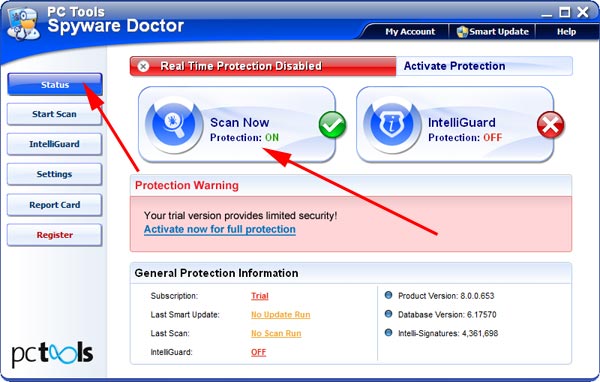
-
After the scan has been completed and scan results have been generated, press "Fix Checked" button to remove Vista Antispyware 2010, Vista Guardian and Vista Internet Security.

- Restart the computer to complete Vista Antispyware 2010, Vista Guardian and Vista Internet Security removal procedure.