1. What is Trojan.AutoRun.A?
It is a Trojan that drops an AUTORUN.INF file in order to automatically execute it when main hard drives are accessed. In other words, when trying to open C, D, E drives in My Computer they will not open normally, instead a message pops when clicked on the drives saying that Windows cannot find xn1i9x.com. The same issue might happen with other names mentioned below:
n1deiect.com
ntde1ect.com
nudeiect.com
ntdelect.com
nideiect.com
ek.com
d.com
usdeiect.com
80avp08.com
dosocom.com
xfoolavp.com
uxdeiect.com
Trojan also drops malicious files, makes them hidden and disables Windows "Show hidden files and folders" function. Deleting any of these files will remain unrealised because Trojan adds a autorun registry which loads files on boot.
Note that, USB Flash Drives will be affected with Trojan.AutoRun.A as well.
The infected AutoRun.inf file is containing the following information:
[AutoRun]
open=xn1i9x.com
;shell\open=Open(&O)
shell\open\Command=xn1i9x.com
shell\open\Default=1
;shell\explore=Manager(&X)
shell\explore\Command=xn1i9x.com
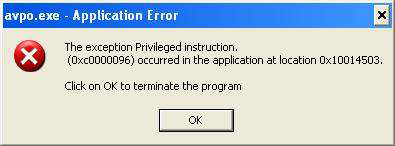
Possible error messages:
Avpo.exe Application Error
Amvo.exe Application Error
Kavo.exe Application Error
n1deiect.com
ntde1ect.com
nudeiect.com
ntdelect.com
nideiect.com
ek.com
d.com
usdeiect.com
80avp08.com
dosocom.com
xfoolavp.com
uxdeiect.com
Trojan also drops malicious files, makes them hidden and disables Windows "Show hidden files and folders" function. Deleting any of these files will remain unrealised because Trojan adds a autorun registry which loads files on boot.
Note that, USB Flash Drives will be affected with Trojan.AutoRun.A as well.
The infected AutoRun.inf file is containing the following information:
[AutoRun]
open=xn1i9x.com
;shell\open=Open(&O)
shell\open\Command=xn1i9x.com
shell\open\Default=1
;shell\explore=Manager(&X)
shell\explore\Command=xn1i9x.com
Possible error messages:
Avpo.exe Application Error
Amvo.exe Application Error
Kavo.exe Application Error
2. How to remove Trojan.AutoRun.A:
- Internet connection might be disabled or Internet browser might be blocked by Trojan.AutoRun.A, so it won't be possible to download any files to infected computer. In this case please download all files required for Trojan.AutoRun.A removal to another computer and then transfer them on the infected one using CD/DVD or USB flash drive.
- To remove Trojan.AutoRun.A download Spyware Doctor and install the program (for the installation guide click here). Before installation, make sure all other programs and windows are closed.
-
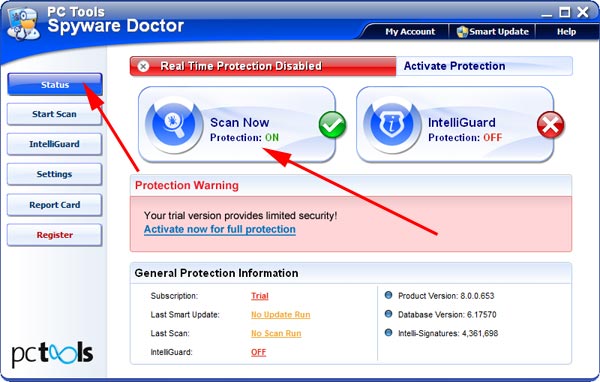
After the installation, computer scan should be started automatically. If so, please move to the next step. If not, click "Status" on the left side menu and press "Scan Now" button to run computer scanner as shown in the picture below:
-
After the scan has been completed and scan results have been generated, press "Fix Checked" button to remove Trojan.AutoRun.A.

- Restart the computer to complete Trojan.AutoRun.A removal procedure.
3. Trojan.AutoRun.A files:
amvo0.dll, gnsmo.dll, amvo1.dll, avp0.dll, taso0.dll, kavo0.dll, kavo1.dllamvo.exe, avpo.exe, avp0.exe, kavo.exe, semo2x.exe
4. Hijackthis entries:
O4 Entries: |
O4 - HKCU\..\Run: [avpa] C:\WINDOWS\system32\avpo.exe |
O4 - HKCU\..\Run: [amva] C:\WINDOWS\system32\amvo.exe |
O4 - HKCU\..\Run: [kava] C:\WINDOWS\system32\kavo.exe |