1. What is Total PC Defender?
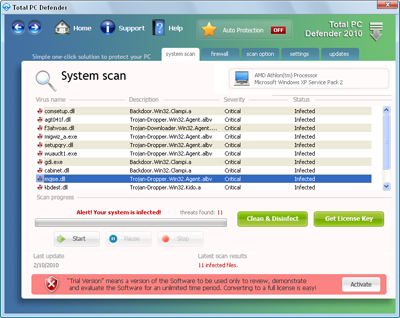
Total PC Defender is rogue computer security software that has been created to scare user into purchasing the license. Total PC Defender behavior reminds scareware, leading to the use of user frightening methods, which makes the victim believe that his computer is infected. This is achieved through fake Total PC Defender computer scanner, which will detect infected files that are either not available or presents legal Windows objects. Total PC Defender is configured so that the program will begin computer scan every time Windows are started.
After Total PC Defender has been installed the following problems will occur:
To start Total PC Defender removal process:
After Total PC Defender has been installed the following problems will occur:
- no Desktop icons;
- no Start Menu;
- no Taskbar;
- no Task Manager (Ctrl + Alt + Delete will not work, displaying message "Task Manager has been disabled by Administrator").
- only Total PC Defender will be visible, which attempting to close will result in a message "The operation is prohibited. Please check your settings".
To start Total PC Defender removal process:
- Restart the computer, even if the Reset button has to be pressed.
- As soon as Windows desktop and icons appear (do not wait until Total PC Defender will be started) launch Notepad* and wait till the following warning appears:

* There are two ways to start Notepad:
1. Go to Start -> Run, type in notepad and press Enter.
2. Go to Start, All Programs, Accessories and select Notepad. - Press Windows key (
 ) on the keyboard to display Start Menu.
 - Click Run and type in (better to copy/paste) REG add HKCU\Software\Microsoft\Windows\CurrentVersion\Policies\System /v DisableTaskMgr /t REG_DWORD /d 0 /f
- Press Ctrl+Alt+Delete.
- In an opened Task Manager window under Processes tab find process named Total PC Defender.exe and click End Process button.
- Proceed by downloading Total PC Defender removal tool below without restarting the computer.
2. Total PC Defender screen shot:
3. How to remove Total PC Defender:
- Internet connection might be disabled or Internet browser might be blocked by Total PC Defender, so it won't be possible to download any files to infected computer. In this case please download all files required for Total PC Defender removal to another computer and then transfer them on the infected one using CD/DVD or USB flash drive.
- To remove Total PC Defender download Spyware Doctor and install the program (for the installation guide click here). Before installation, make sure all other programs and windows are closed.
-
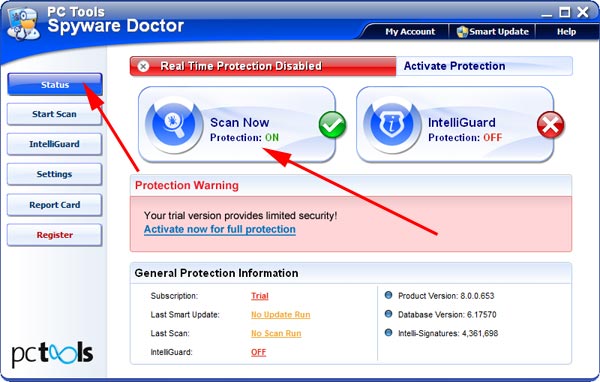
After the installation, computer scan should be started automatically. If so, please move to the next step. If not, click "Status" on the left side menu and press "Scan Now" button to run computer scanner as shown in the picture below:
-
After the scan has been completed and scan results have been generated, press "Fix Checked" button to remove Total PC Defender.

- Restart the computer to complete Total PC Defender removal procedure.
Security Warning by Total PC Defender:
- Security Warning! Malicious programs that may steal your private information and prevent your system from working properly are detected on your computer. Click here clean your PC immediately.
4. Total PC Defender files:
C:\Program Files\Total PC Defender\Total PC Defender.exe5. Hijackthis entries:
O4 - HKLM\..\Run: [Total PC Defender] C:\Program Files\Total PC Defender\Total PC Defender.exe |