1. What is System Alert popup?
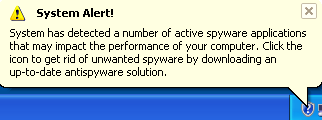
Appearing like original Windows elements, System Alert pop-ups are displayed as a result of trojan infection which is known as Trojan.Zlob.
Security alert icon usually comes in a shape of alternately blinking "X" and "?" in a red circle (or shield) or "!" in a yellow triangle. System alert popup appears in the taskbar area alarming the user that the computer is infected or at risk. Occasionally popping fake alerts warn that spyware, virus or some infection has been found and that it can cause system failure. Anti-spyware product for virus removal is suggested along by asking user to click the balloon in order to download advertised antispyware product and when clicked on goes to the rogue anti-spyware site.
Other similar warnings to "System Alert!" are:
"Critical System Warning!"
"Critical System Error"
"System Alert: Malware threats"
"Security Alert: Spyware found"
"Security Warning"
"Security Alert"
"System performance monitor: Warning"
"Your computer is infected"
"Virus Alert"
Security alert icon usually comes in a shape of alternately blinking "X" and "?" in a red circle (or shield) or "!" in a yellow triangle. System alert popup appears in the taskbar area alarming the user that the computer is infected or at risk. Occasionally popping fake alerts warn that spyware, virus or some infection has been found and that it can cause system failure. Anti-spyware product for virus removal is suggested along by asking user to click the balloon in order to download advertised antispyware product and when clicked on goes to the rogue anti-spyware site.
Other similar warnings to "System Alert!" are:
"Critical System Warning!"
"Critical System Error"
"System Alert: Malware threats"
"Security Alert: Spyware found"
"Security Warning"
"Security Alert"
"System performance monitor: Warning"
"Your computer is infected"
"Virus Alert"
2. System Alert popup screen shot:
3. How to remove System Alert popup:
- Internet connection might be disabled or Internet browser might be blocked by System Alert popup, so it won't be possible to download any files to infected computer. In this case please download all files required for System Alert popup removal to another computer and then transfer them on the infected one using CD/DVD or USB flash drive.
- To remove System Alert popup download Spyware Doctor and install the program (for the installation guide click here). Before installation, make sure all other programs and windows are closed.
-
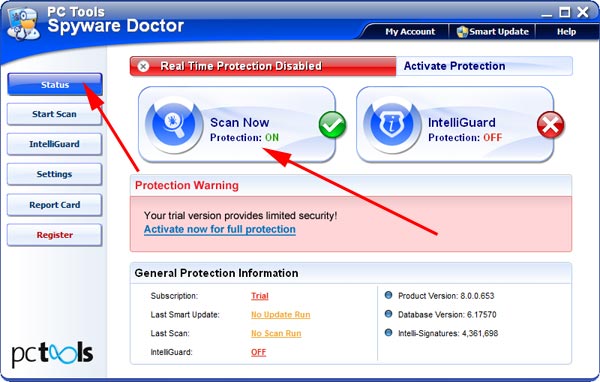
After the installation, computer scan should be started automatically. If so, please move to the next step. If not, click "Status" on the left side menu and press "Scan Now" button to run computer scanner as shown in the picture below:
-
After the scan has been completed and scan results have been generated, press "Fix Checked" button to remove System Alert popup.

- Restart the computer to complete System Alert popup removal procedure.
4. System Alert popup files:
sdrmod.dll, bonrep.dll, ekxdvft.dll, hdtip.dll, bonsws.dll, jokwmp.dll, leosrv.dll, voipwet.dll.5. Hijackthis entries:
O2 Entries: |
O2 - BHO: e404 helper - {F10587E9-0E47-4CBE-84AE-7DD20B8685CC} - C:\Program Files\Helper\??????????.dll (? - random digit) |
* can also be found under these CLSIDs: |
{8BD4438C-2511-4B93-AD34-2BDCD0FF78D2} |
{F10587E9-0E47-4CBE-ABCD-7DD20B862223} |
{F10587E9-0E47-4CBE-84AE-7DD20B8633DD} |
{F10587E9-0E47-4CBE-ABCD-7DD20B8622FF} |
{C03FD59D-9104-44B7-929A-9EAA0BA05211} |
O3 Entries: |
O3 - Toolbar: The sdrmod - {30DACEEB-1BAE-4D12-966B-D4C35359B9A8} - C:\WINDOWS\sdrmod.dll * |
* can also be found under these CLSIDs: |
{89DA4F2C-91AE-44B2-84A9-A5D9F682E737} |
{BA79EE59-166F-4E9E-90A6-56489C45B48A} |
{521A5897-9EA7-43B4-A51D-B4C11D67BEEF} |
{210F79EC-C4B8-4AD5-B5B7-2B228F4376E9} |
{16A0662E-AC21-4AD9-89E8-7495AC5ACE93} |
O3 - Toolbar: The NetworkControl - {3B28B033-8C1B-47DE-803D-3CF3AAE2CD20} - C:\WINDOWS\sdrmod.dll |
O3 - Toolbar: The bonrep - {6BBD76F0-FDBB-4D2D-AD36-5C922F510AF5} - C:\WINDOWS\bonrep.dll * |
* can also be found under these CLSIDs: |
{9BA420D2-40A3-431D-A863-531B0FBA0569} |
{2357FC16-D8FC-4BF6-AFCA-573F9BD52644} |
{17943327-95B1-4F8B-9534-8F82C2497211} |
{1277B39C-708C-4A64-9763-B122C18949B0} |
O3 - Toolbar: The hdtip - {70EC7CA3-2FFC-4E43-97DE-3C91B2F65D36} - C:\WINDOWS\hdtip.dll * |
* can also be found under these CLSIDs: |
{85B2F289-7128-4C5A-A330-F9FC01432D3A} |
{872F66C1-E394-4545-8843-EDE16648058A} |
{382C8A97-BFEF-47B5-9770-87C4DE651E37} |
{0C12E004-19C1-4B19-9C63-6321CF547432} |
{7E259026-2CBD-4F42-AB62-230C0D4ABDAD} |
{CBF5124B-3294-4441-9B5C-30297F50E02C} |
{9C2D86AA-4067-4270-8D51-E6DC5E805D62} |
{17D69B84-065B-4F88-AFE8-3BA9B4907501} |
{F4BEC60B-9CEE-4A91-91FB-8DA8DE3CA166} |
{E3E087D3-CA1D-4ECA-9960-D85944C2554C} |
O3 - Toolbar: The bonsws - {7BF35567-E7C5-4646-8F65-41898BEF0637} - C:\WINDOWS\bonsws.dll * |
* can also be found under these CLSIDs: |
{422CA3AF-86F1-4607-88E2-BBBD4E9371EB} |
{CBF19702-9D5B-44E7-8F8A-6750209B76F3} |
{3FDA21ED-312C-44DD-9030-A2DC90FD1CCD} |
{E3ED01B7-EAF2-4A33-989C-B95E65DA0415} |
{05E9894E-9C5F-454B-A6E1-7BEF518EC87E} |
O3 - Toolbar: The jokwmp - {6BA27973-068D-4F85-BE84-1251E0B20FD3} - C:\WINDOWS\jokwmp.dll * |
* can also be found under these CLSIDs: |
{D71F3444-606D-46EB-9ABE-DF80E5E9BF67} |
{E75C0DB5-5DF7-4DF0-9761-8EFCD1783912} |
{9E004C23-5424-4C79-BAFE-C2B3460ECB56} |
{459C681F-AA94-49B7-A55B-110D924E5FCE} |
{54BA2889-CF6C-4D57-B2FB-B3FE1CA9EE8F} |
{1C56ED66-9488-4D8F-B028-8BBABABB8361} |
{3E57AE0B-0AAB-4919-B74E-8C29579C6CA5} |
{51F0D2B7-06E2-40D0-B8B8-39E630888B30} |
{AB9235F6-DB9F-4FDC-AAFB-A3BAF1849E34} |
{2623E5C5-B0C2-4300-8C63-9F51D133CA0A} |
O3 - Toolbar: The voipwet - {167F6405-019D-4F32-8FBE-23B3C63CD8FD} - C:\WINDOWS\voipwet.dll * |
* can also be found under these CLSIDs: |
{0687766B-F048-43D1-B33B-DBE6FE9AE712} |
{D4170A6E-8CE3-444B-ACA4-B3A0AF12C55C} |
{0F54B96C-3482-407B-9C9C-A671E08271B5} |
{28D203F3-4B8F-4BB4-A28D-6657BF1E3C2C} |
{DE38D02F-5257-4CF6-A13F-B6B9FCFC1090} |
{DD7D207A-B829-4EDA-9CBD-6A3B6E7A893C} |
{476B38B7-6E7C-46B4-8080-F61ED0E814F2} |
{F3F399B3-5330-4242-A600-094136899EE9} |
{224E1433-F086-4BB1-B791-AF87F7629D93} |
O3 - Toolbar: The leosrv - {257F0149-3042-4F1E-97A1-7602460E97EE} - C:\WINDOWS\leosrv.dll * |
* can also be found under these CLSIDs: |
{DCBF721A-11E3-4FB8-93D6-9AE46178D5B6} |
{8B6860DE-2CFA-4713-B42F-DC06D008DC54} |
{F7C394C7-BFBD-4A20-AD14-2AA94424C09C} |
{14E52265-CCA3-4F78-A21B-88F4EE6E78C1} |
O3 - Toolbar: ekxdvft - {DEEAF2E6-CBD6-4E9A-B7A7-C17C7C49F697} - C:\WINDOWS\ekxdvft.dll |
* can also be found under these CLSIDs: |
{0DE4BA7A-FF54-4757-AE1F-30EE7FE6B11D} |
{1817219B-D6DC-450A-B913-41F12BC05019} |
{1BF97F11-E184-42BD-8E57-EDBA3CFB4F7A} |
{23FBB938-35AC-4C50-8776-C0B5CA912216} |
{2C70348E-974D-43FD-8FC7-BE3C57B6E95F} |
{3BA32929-E727-47BD-8489-F3AEE254FFF9} |
{760C9BE3-C98A-4F34-BE60-9174C594FE47} |
{9CBC96F1-F837-430D-8D6E-E19ED124D2D2} |
{AE06A911-A5A5-4DFA-9ADA-1DF21EAB25C6} |
{AF2AF78D-33A4-4BA6-AFEC-5F453630DFBE} |
{C87444C3-8B83-4A48-91DE-95F9A3D61070} |
{D7257984-3F99-4D51-87C6-4D5E111DEBA9} |
{DBAF3291-D08D-4C8B-A960-D85A42FEE02F} |
{DC7A3552-A87C-4788-8DD7-648B9AD8EC41} |
{E5CBFDFA-6B88-4C04-AC4C-C6875D808503} |
{F25117E3-2A27-4A0C-88EE-D9307F678DD0} |