1. What is AntiMalware?
AntiMalware is an inefficient computer program, with fraudulent intents. The basic substance of these programs is to mislead the consumer, by convincing him that the computer system is infected with viruses and other threats. In response to false reports, it is expected that a user will search for a solution towards simulated problems. Therefore, a rogue program - AntiMalware – will be offered as problems, related to computer security, disposer.
AntiMalware will display various warning messages in order to mislead the consumer:
As AntiMalware belongs to fake AV category, money transfers for licensed version are not recommended. Even if you buy the license, AntiMalware will not remove any of computer threats, and the system will not be protect against serious attacks.
AntiMalware will display various warning messages in order to mislead the consumer:
- Registration required
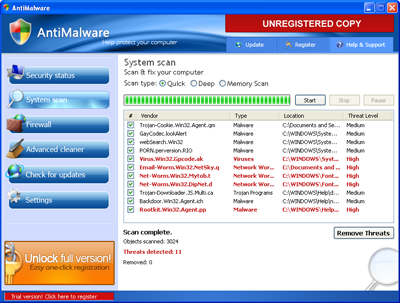
There were found 11 dangerous viruses on your computer. It is strongly recommended to remove them ASAP. - AntiMalware network security alert
Your computer is beeing attacked from remote host. Attack has been classified as Remote code execution attempt. - Danger!
Your computer and all your personal data are in serious danger. Protection: Please, click the balloon to get details. - Warning!
Most of the viruses and worms on your PC because of visiting porno sites or warez/torrent sites. - Security alert
User's activity loggers detected! It's strongly recommended to remove detected threats right now! - AntiMalware detected the virus of the harmful program on your computer!
Internet Explorer is infected with worm Rootkit.Win32.Agent.pp. This worm can harm your computer.
- Security Center Alert
Do you want to block this software Suspicious? Name: Net-Worm.Win32.DipNet.d
As AntiMalware belongs to fake AV category, money transfers for licensed version are not recommended. Even if you buy the license, AntiMalware will not remove any of computer threats, and the system will not be protect against serious attacks.
2. AntiMalware screen shot:
3. How to remove AntiMalware:
- Internet connection might be disabled or Internet browser might be blocked by AntiMalware, so it won't be possible to download any files to infected computer. In this case please download all files required for AntiMalware removal to another computer and then transfer them on the infected one using CD/DVD or USB flash drive.
- To remove AntiMalware download Spyware Doctor and install the program (for the installation guide click here). Before installation, make sure all other programs and windows are closed.
-
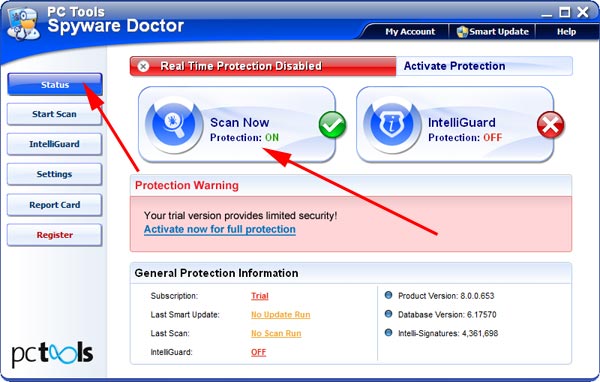
After the installation, computer scan should be started automatically. If so, please move to the next step. If not, click "Status" on the left side menu and press "Scan Now" button to run computer scanner as shown in the picture below:
-
After the scan has been completed and scan results have been generated, press "Fix Checked" button to remove AntiMalware.

- Restart the computer to complete AntiMalware removal procedure.
4. AntiMalware files:
antimalware.exe5. Hijackthis entries:
O4 - HKCU\..\Run: [AntiMalware] "C:\Program Files\AntiMalware\antimalware.exe" -noscan |