1. What is AntiAID?
AntiAID program was designed for dastardly purposes, which the consumer may be infected with while surfing the Internet. The main program task - using fraudulent methods, show user that the computer system is vulnerable and contains malicious objects. AntiAID belongs to WiniGuard Family and is spread by a Trojan FakeSmoke.
For most rogue programs, including AntiAID, effective user fraud methods are applied, which mislead the victim toward unnecessary purchase - fake anti-virus program license. To show user that his computer is at risk and to divert his attention, criminals use corrupt online computer scanner, very similar to "My Computer" window, so that the victim would see the existence of viruses and download AntiAID as a threat removal tool. After rogue program has been downloaded the following effective techniques are used:
For most rogue programs, including AntiAID, effective user fraud methods are applied, which mislead the victim toward unnecessary purchase - fake anti-virus program license. To show user that his computer is at risk and to divert his attention, criminals use corrupt online computer scanner, very similar to "My Computer" window, so that the victim would see the existence of viruses and download AntiAID as a threat removal tool. After rogue program has been downloaded the following effective techniques are used:
- A fake version of Windows Security Center, which is used for AntiAID promotional purposes;
- Excessive amount of warning messages stating about computer security weaknesses;
- Inability to uninstall rogue program using Add/Remove Programs utility.
- Attention: Danger!
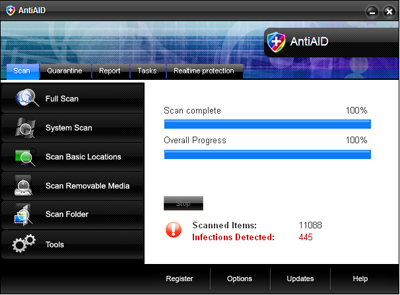
AntiAID has detected 445 critical spyware objects while scanning the system. Register AntiAID to block or remove threatening objects. Click "Clean" to register the version to render revealed threats. - Spyware Alert!
Your computer is infected with spyware. It could damage your critical files or expose your private data on the internet. Click here to register your copy of AntiAID and remove spyware threats from your PC.
2. AntiAID screen shot:
3. How to remove AntiAID:
- Internet connection might be disabled or Internet browser might be blocked by AntiAID, so it won't be possible to download any files to infected computer. In this case please download all files required for AntiAID removal to another computer and then transfer them on the infected one using CD/DVD or USB flash drive.
- To remove AntiAID download Spyware Doctor and install the program (for the installation guide click here). Before installation, make sure all other programs and windows are closed.
-
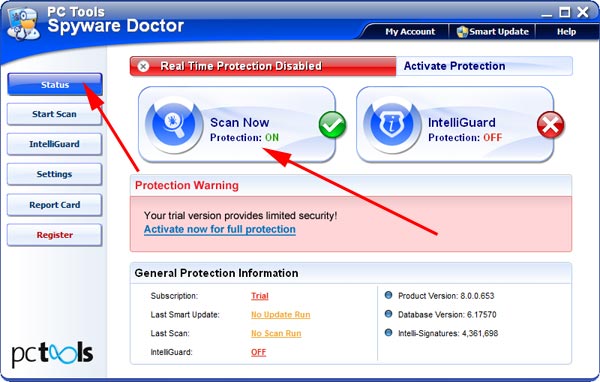
After the installation, computer scan should be started automatically. If so, please move to the next step. If not, click "Status" on the left side menu and press "Scan Now" button to run computer scanner as shown in the picture below:
-
After the scan has been completed and scan results have been generated, press "Fix Checked" button to remove AntiAID.

- Restart the computer to complete AntiAID removal procedure.
4. AntiAID files:
rk79jdu9.exe, AntiAID.exe5. Hijackthis entries:
O4 - HKCU\..\Run: [AntiAID] C:\Program Files\AntiAID Software\AntiAID\AntiAID.exe -min |