1. What is Advanced Defender?
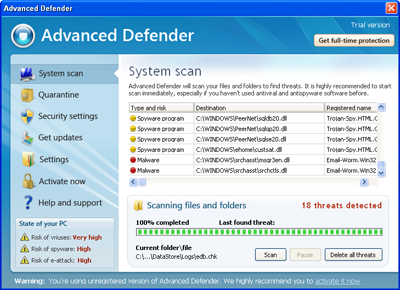
Advanced Defender is a tricky program that is used to deceive computer user by making him believe that his machine is infected. The program is also referred as rogue software. The main objective of Advanced Defender is fake virus detections that are simulated by corrupt computer scanner, which comes with the program. In other words, Advanced Defender simulates computer check, creating a report of found threats in the end, thus making user believe that his computer has been infected.
Indeed, viruses do not exist on victim's computer, it only says so for fraudulent purposes. Scan report states that the legitimate Windows files (e.g. explorer.exe) are infected, assigning a name (e.g. Backdoor.Netbus) each of them. The report also includes irrelevant files that have been uploaded during Advanced Defender installation in order to simulate viruses.
Advanced Defender will block computer applications, what means trying to open some program (e.g. Notepad) a warning message will be displayed:
To start Advanced Defender removal process:
Indeed, viruses do not exist on victim's computer, it only says so for fraudulent purposes. Scan report states that the legitimate Windows files (e.g. explorer.exe) are infected, assigning a name (e.g. Backdoor.Netbus) each of them. The report also includes irrelevant files that have been uploaded during Advanced Defender installation in order to simulate viruses.
Advanced Defender will block computer applications, what means trying to open some program (e.g. Notepad) a warning message will be displayed:
- Advanced Defender Warning | Notepad is infected with worm Lsas.Blaster.Keyloger. This worm is trying to send your credit card details using Notepad to connect to remote host.
- Warning! | General protection of your PC is switched off or absent, so you are exposed to different kinds of threats - viruses, adware, spyware. Let Advanced Defender help you. Enable your protection immediately.
To start Advanced Defender removal process:
- Go to Windows directory and open System32 folder (C:\Windows\system32).
- Rename file taskmgr.exe to iexplore.exe or taskmgr to iexplore if file extensions are hidden.
- Double-click renamed file iexplore or iexplore.exe. If you were able to open Task Manager go to Step5.
- If Task Manager still cannot be started, resulting in "Task Manager has been disabled by your administrator" message, go to Start -> Run, type in REG add HKCU\Software\Microsoft\Windows\CurrentVersion\Policies\System /v DisableTaskMgr /t REG_DWORD /d 0 /fand click OK. Then repeat Step3.
* Editing Windows Registry is complicated and should be performed by advanced computer user. Use this guide at your own risk. - Under Processes tab search for advanceddefender.exe and end the process, by selecting it and clicking End Process button.
- Proceed by downloading Advanced Defender removal tool below without rebooting the computer.
2. Advanced Defender screen shot:
3. How to remove Advanced Defender:
- Internet connection might be disabled or Internet browser might be blocked by Advanced Defender, so it won't be possible to download any files to infected computer. In this case please download all files required for Advanced Defender removal to another computer and then transfer them on the infected one using CD/DVD or USB flash drive.
- To remove Advanced Defender download Spyware Doctor and install the program (for the installation guide click here). Before installation, make sure all other programs and windows are closed.
-
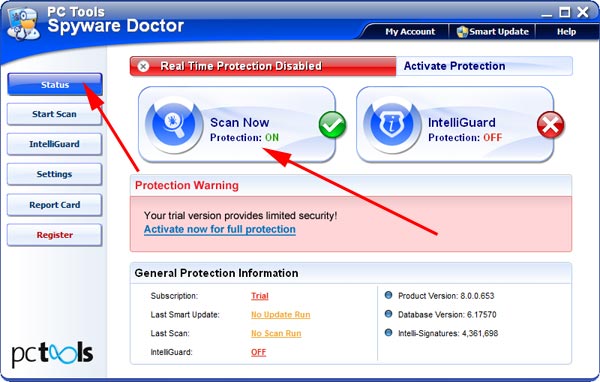
After the installation, computer scan should be started automatically. If so, please move to the next step. If not, click "Status" on the left side menu and press "Scan Now" button to run computer scanner as shown in the picture below:
-
After the scan has been completed and scan results have been generated, press "Fix Checked" button to remove Advanced Defender.

- Restart the computer to complete Advanced Defender removal procedure.